tw-stock-mod
A stock watchlist band above the Claude Code prompt, in the style of a broker's watchlist table. Taiwan trading hours show the Taiwan list, US trading hours show the US list, and the red/green convention flips with the market: 台股紅漲綠跌、美股綠漲紅跌. Price is the main column. A watchlist over five symbols draws two side by side instead of scrolling, and the 趨勢圖 button swaps the table for one symbol's K bars.
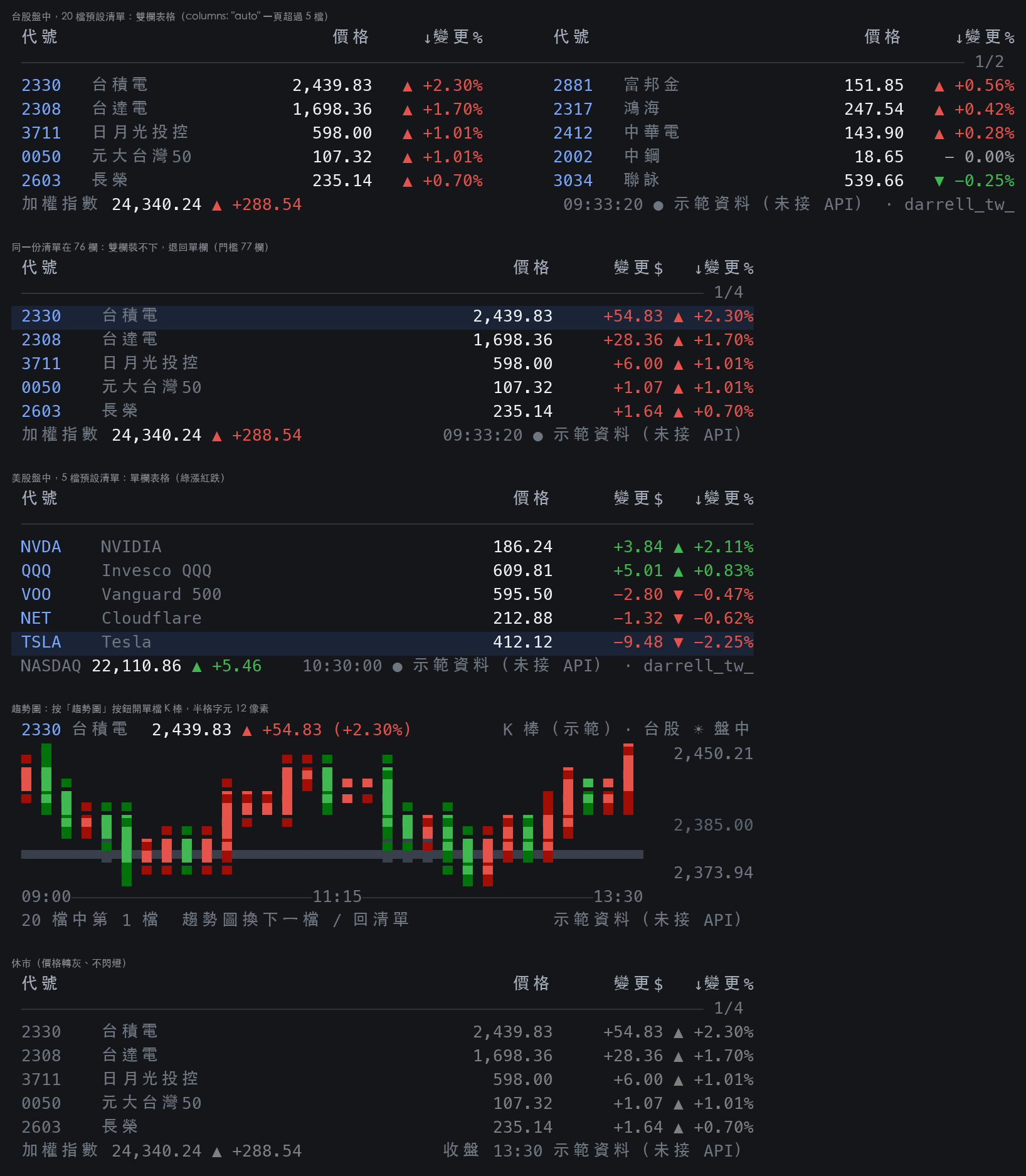
Both markets are live, each from its own source, and the footer says which.
Both read Yahoo's public endpoints by default (Yahoo 即時 for the US,
Yahoo 延遲 for Taiwan, since Yahoo's Taiwan quotes run about twenty minutes
behind) — no key and no account either way. Set "twSources": ["shioaji"] for
real intraday ticks through a 永豐 brokerage account, or ["capital"] for a
群益 one on Windows — the band runs the fetcher itself either way (永豐 即時 /
群益 即時). A market the feed cannot reach falls back to a
deterministic sine walk off each symbol's previous close and the footer says
示範資料(未接 API), so the tag always tells you what you are looking at.
See The live feed.
損益 shows your holdings, not just the watchlist. It is a stop in the
market button's own cycle (美股 → 台股 → 台股庫存, …) — landing on it opens a
sortable, scrollable P&L table (張數/成本/現價/今日%/今日損益/總損益/損益% per
position, plus a portfolio total) read from a holdings block in
stock-band.json (the recommended spot for hand-written positions), or from
stock-holdings.json — the runtime dir's copy is the fetcher's own output,
and <project>/.claude/ holds an advanced manual override. See
Holdings and the 損益 view.
Layout, colors and badges are ported from
prototype/stock-band-demo.py — read that
first if the numbers in hooks/board.tsx look arbitrary.
Requirements
-
Claude Code 2.1.269 or later, with
CLAUDE_CODE_ENABLE_FUNCTION_HOOKS=1set in~/.claude/settings.json:{ "env": { "CLAUDE_CODE_ENABLE_FUNCTION_HOOKS": "1" } }(Merge the
envkey if the file already has one.) -
An interactive terminal. The band is
AbovePrompt, so nothing draws inclaude -p, the desktop app or mobile. Measured on macOS iTerm2, Terminal.app, and tmux. Windows and the VS Code integrated terminal are untested — reports welcome.
Install
Install from inside the project you want the band in. --scope local keeps
the mod in that one project, so your other projects keep a clean prompt:
claude plugin marketplace add darrell-tw/darrelltw-mods
cd /path/to/your/project
claude plugin install tw-stock-mod@darrelltw-mods --scope local
Restart Claude Code in that project and the band appears above the prompt.
Drop --scope local to get the band in every project on the machine.
Or try it for one session without installing:
git clone https://github.com/darrell-tw/darrelltw-mods.git
CLAUDE_CODE_ENABLE_FUNCTION_HOOKS=1 claude --plugin-dir darrelltw-mods/mods/tw-stock-mod
To remove it:
claude plugin uninstall tw-stock-mod@darrelltw-mods --scope local
claude plugin marketplace remove darrelltw-mods
Run the uninstall from the same project, and match the scope you installed
with: a user install needs --scope user. Uninstalling leaves the runtime
files behind in ~/.claude/stock-band/<project slug>/ (quote cache,
heartbeat, a broker fetcher's log and pid, the SDK's own shioaji.log or
CapitalLog/, and any holdings it fetched) — delete that whole folder to
clean those up too, using the same slug rule as 哪個檔放哪裡 below. The folder
only exists once a broker fetcher has run; a Yahoo-only install never creates
it. On Windows the same folder sits under %USERPROFILE%, since Windows does
not set HOME.
哪個檔放哪裡. ~/.claude/stock-band.json(使用者層級,不進版控)放個人偏好——
twSources、shioaji/capital 的券商路徑;<project>/.claude/stock-band.json
(可進版控)放觀察清單。專案檔的 key 蓋掉個人檔同名的 key,見
Configure。
band 不會在你的 repo 裡寫任何檔。 報價、庫存、心跳、券商 log、券商 pid 這五個
執行期檔案都寫進 ~/.claude/stock-band/<專案路徑 slug>/,不再寫進專案的 .claude/
——<project>/.claude/stock-band.json 因此可以放心進版控,只有券商路徑該留在個人檔。
SDK 自己寫的 log 也在這個執行期目錄:fetch-quotes-shioaji.py 會先切到這裡再匯入
shioaji,fetch-quotes-capital.py 則把 SKCOM 的 CapitalLog/ 指到這裡,所以都不會
跑進你的 repo。Windows 沒有 HOME,這個目錄會落在 %USERPROFILE% 底下,slug 也會把
磁碟機代號的冒號和反斜線一起換成 -(D:\app → D--app)。
Nothing shows up?
Four different causes produce the exact same symptom — no band, and no error message anywhere — so check all four in order:
-
claude --versionneeds to be 2.1.269 or later. -
Open Claude Code in that project and run
! echo $CLAUDE_CODE_ENABLE_FUNCTION_HOOKS. It needs to print1. A blank line means the flag is off — merge{ "env": { "CLAUDE_CODE_ENABLE_FUNCTION_HOOKS": "1" } }into~/.claude/settings.json(add just that key ifenvalready exists). -
Fully quit and reopen Claude Code after editing settings.
/reload-pluginsdoes not re-readenv. -
Confirm the mod installed into the project you have open right now (
--scope localscopes one install to one project):sed -n '/tw-stock-mod@darrelltw-mods/,/^ \]/p' ~/.claude/plugins/installed_plugins.json | grep projectPathIt prints one path per install; this project must be one of them. If it is not, run the install command again from inside this project's directory. (
claude plugin listwill not help here — every local install prints the sametw-stock-mod@darrelltw-mods / Scope: localline with no path.)
What the band shows
The built-in Taiwan watchlist is 20 symbols, so the two-column table is what a fresh install actually shows for Taiwan:
 台股 ▾  ☀ 盤中 09:00-13:30                    [翻頁 1/2] [趨勢圖] [收起 30分]
 代號              價格    變更%     代號              價格    變更%
 ──────────────────────────────────────────────────────────────────
 2382   廣達      341.56  ▲ +2.57%   2891   中信金      70.06  ▲ +0.52%
 2330   台積電  2,423.04  ▲ +1.59%   2412   中華電     143.95  ▲ +0.31%
 3711   日月光投控 599.88 ▲ +1.33%   1301   台塑         62.13  ▲ +0.21%
 2603   長榮      235.81  ▲ +0.99%   2002   中鋼         18.67  ▲ +0.11%
 0050   元大台灣50 107.16 ▲ +0.86%   006208 富邦台50    243.67  ▲ +0.07%
 加權指數 46,143.02 ▲ +280.50               13:12:25 ● Yahoo 延遲 · darrell_tw_
The built-in US watchlist is 20 symbols too, so it draws the same two-column table (this one is the real board fed by Yahoo, US session closed):
 美股 ▾  ☾ 休市 下次開盤 09:30 ET            [翻頁 1/2] [趨勢圖] [收起 30分]
 代號                           價格     ↓變更%       代號                           價格     ↓變更%
 ────────────────────────────────────────────────────────────────────────────────────────────── 1/2
 CRWD   CrowdStrike           242.49   ▲ +3.02%       MU     Micron                927.60   ▲ +0.39%
 AMD    AMD                   504.20   ▲ +2.19%       PLTR   Palantir              172.56   ▼ -0.43%
 ARM    Arm                   241.83   ▲ +1.18%       VOO    Vanguard 500          696.20   ▼ -0.44%
 META   Meta                  670.24   ▲ +0.70%       AAPL   Apple                 331.34   ▼ -0.52%
 NVDA   NVIDIA                212.17   ▲ +0.57%       QQQ    Invesco QQQ           704.54   ▼ -0.65%
 NASDAQ  25,981.57 ▼ -204.84                    收盤 16:00 · 30s Yahoo 即時 · darrell_tw_
Cut the list to five symbols, or set "columns": 1, and the same board draws
the single-column table instead — that one keeps the 變更$ column and the
highlighted top mover:
 美股 ▾  ☾ 休市 下次開盤 09:30 ET                        [趨勢圖] [收起 30分]
 代號                          價格      變更$   變更%
 ──────────────────────────────────────────────────
 TSLA    Tesla                366.33     +0.89 ▲ +0.24%
 QQQ     Invesco QQQ          715.56     +0.68 ▲ +0.10%
 NVDA    NVIDIA               218.28     -0.01 ▼ -0.00%
 VOO     Vanguard 500         699.16     -3.40 ▼ -0.48%
 NET     Cloudflare           304.77     -1.76 ▼ -0.57%
 NASDAQ 26,306.53 ▼ -26.51                  收盤 16:00 Yahoo 即時 · darrell_tw_
- The title row is the market button.
台股 ▾/美股 ▾names the market ON THE BAND, and nothing else — two markets, two labels. A session starts on the clock's pick and keeps tracking it until you press; the press shows the other market, and after that the button just toggles the two. (There is no third "auto" stop on the cycle: pressing into it would redraw the same board and read as a dead button, and"market": "auto"in the config is what puts a fresh session back on the clock.) The session state (☀ 盤中orange /☾ 休市blue), the hours, and — when there is room — the same hours restated in Taipei time sit next to it.翻頁/趨勢圖/收起 30 分stay right-aligned in the same row. In the trend view the row changes: the session state and hours step aside (the chart draws its own title with both on it) and◀ 上一檔/下一檔 ▶ n/N/回清單take that space, left- aligned beside the market button — next to the symbol they move through, rather than across the terminal from it. No hotkeys: a letter hotkey only fires once a Button already holds the focus ring, which buys nothing over Enter, and a digit hotkey would eat a prompt that starts with that digit — every button here is a click, or focus then Enter. - 8 rows below that in the table (header, rule, five quote rows, footer); the chart view keeps its own 9, title included, since that title names the symbol being charted rather than the market. Price gets the widest, brightest column in the single-column table, with its own breathing room; change$ and change% are right-anchored after it, capped at column 74. Under ~46 columns the name goes too.
- Two columns once the watchlist holds more than five symbols —
columnsin the config controls it (see Configure). Each half only carries 代號/名稱/價格/變更% (變更$ has no room next to a second symbol), filled column-major off the current sort: the left half is ranks 1–5 on the page, the right half ranks 6–10, so the biggest gainers head the left column and the biggest fallers end the right one under the default change% sort. A 6-column gutter separates the halves so 變更% and the next 代號 do not read as one run of digits, and the two-column table caps at 104 columns (the single-column one caps at 74). Below 77 columns it falls back to the single-column table instead of squeezing — a half needs at least 35 columns (代號 + a name + 價格 + 變更%; seeMIN_HALF_WIDTHinhooks/board.tsx), and two of those plus the gutter is 76 out ofwidth - 1. - Rows are sorted by change% (hence
↓變更%in the header); the biggest mover gets the highlighted row in the single-column table. Two-column mode drops the highlight — a row there can hold two unrelated symbols, so there is no single "this row" to stripe."sort": "list"keeps your own order. - Closed: prices go gray, the blink stops, and the header reads
休市 下次開盤 09:00with收盤 13:30on the right. Outside both sessions the band keeps showing the market that closed most recently — its closing prices are the news right after 13:30 — until the other market is within an hour of opening. - The footer's right end is the clock — bare while the market is open
(
13:12:25), since its place on the row already says it is live;收盤 13:30once it closes — its live dot, the countdown to the next feed request, the source tag, and the credit sign-off, in that order. A narrow row drops the least essential piece first: the countdown, then the credit, then the clock and dot, always keeping the source tag — knowing what prices you are looking at matters more than anything else here.
The trend view (K bars)
 台股 ▾  ◀ 上一檔  下一檔 ▶ 2/10  回清單                        [收起 30分]
 2330 台積電  1,188.29 ▲ +23.29 (+2.00%)           K 棒(示範)· 台股 ☀ 盤中
 ▀▄          ▄▀▀▀▀▄          ▄▀▄▀▀          ▄▄▀▄▀▄          ▄▀▀   1,190.77
  ...candles, one per two columns, red/green by bar direction...
 09:00────────────────────────11:15───────────────────────13:30
 10 檔中第 2 檔                                    示範資料(未接 API) · darrell_tw_
Same 9 rows as the button row draws it into, one symbol's candles instead of
the table — this view keeps its own title row, since the line names the
symbol rather than the market. The plot is 6 terminal rows of 12 pixel
rows: each cell packs two pixels as a half-block (▀ with the top pixel as
foreground and the bottom as background) — and unlike braille, those glyphs
are everywhere. Body color
follows the market's convention (a bar that closed above its open is red on
the Taiwan board), wicks are the same hue darkened, and the previous close is
a faint horizontal reference line. The right edge carries high / previous
close / low; the axis under the plot is the session's own clock.
Bars come from the quotes file (bars), so with no feed connected the chart
draws demo bars and says so in the title. Only the focused symbol's bars are
sent to the board, which is why moving through the list is a button press
rather than a scroll.
Three buttons, one job each. ◀ 上一檔 and 下一檔 ▶ step through the
symbols on the current page and wrap around at both ends; 回清單 leaves.
They replace a single 趨勢圖 button that used to mean all three things at
once — enter the view, step forward, and fall out to the table on the last
symbol — which left no way back to the symbol you had just passed and no exit
except walking to the end of the list.
Or click the row. Clicking a quote in the table opens that symbol's chart
directly, so reaching the tenth symbol costs one click rather than ten presses.
The whole half-row is the target, not just the four characters of the code. A
Client has no Button, so the board hit-tests the pointer itself and posts
the row back to the hook module (surface.onPointer → surface.post →
ui.message). Clicking is an addition, not a replacement: the table is not on
screen once the chart is up, so the three buttons remain the only way to move
between symbols from there.
Configure
Everything has a default; the band works with no config at all. To change the
watchlist, copy stock-band.example.json to
<project>/.claude/stock-band.json.
Two config files, merged. ~/.claude/stock-band.json (a USER-level file,
never inside a project — outside version control) is read first, then
<project>/.claude/stock-band.json on top of it: any key the project file
states wins, and any key only the user file states still applies. Your own
source order and broker paths (twSources, shioaji, capital) belong in the
user-level file, so a shared project's config stays neutral and each person
who opens it keeps their own preference — see
Your own source order.
| key | default | meaning |
|---|---|---|
market | "auto" | the state a session starts in: auto picks by the clock and keeps tracking it until the market button is pressed; tw/us opens on that market instead |
marketSwitcher | "menu" | how the market button lets you jump between markets/holdings: menu (default) is a header Button (市場:台股 ▾) that opens a column of plain option Buttons below it — every option takes a mouse click, unlike select's dropdown (below); select is the engine's own dropdown, 市場: ... — reads great but its options only take the keyboard (arrows + Enter) while it holds focus, no click; tabs draws every stop (台股/台股庫存/美股/美股庫存/加密貨幣) as its own Button in a row, and drops to cycle on a terminal too narrow to fit them; cycle is one Button that walks the stops in order. An unrecognized value falls back to menu |
refreshMs | 3000 | how often the module rebuilds the snapshot (min 1000; fixed at session start — changing it needs /reload-plugins) |
sort | "change" | change = by change% desc, list = your order |
highlight | true | highlight the biggest mover's row (single-column table only) |
columns | "auto" | how many symbols a row draws: auto = 1 when the watchlist is 5 symbols or fewer, 2 for 6 or more; 1/2 force it (the board still falls back to 1 if the terminal is too narrow — see What the band shows) |
feed | "auto" | auto prices whichever market is on the band; both keeps the other side warm; tw/us pins one; off = demo prices only |
twSources | ["yahoo"] | Taiwan's routes, in preference order — the band tries the first and falls through to the next for a tick that one has nothing fresh for. yahoo = Yahoo, ~20 min behind Taiwan but one request whatever the list length; shioaji = 永豐 real-time ticks on macOS/Linux and capital = 群益 real-time ticks on Windows, the band runs the fetcher itself either way — see 永豐 Shioaji as that fetcher and 群益 Capital as that fetcher. A legacy "twSource": "x" (a single string) still works as an alias for ["x"]. The shipped default never includes a broker route — put that in your own ~/.claude/stock-band.json |
shioaji | { "python": "python3", "env": "~/.sinobon.env", "interval": 10 } | read only when "shioaji" is somewhere in twSources — the interpreter, the env file holding SINOBON_API_KEY/SINOBON_SECRET_KEY (~ expands to $HOME), and seconds between snapshots |
capital | { "python": "python", "env": "~/.capital.env", "dll": "", "interval": 10, "indices": [TSEA, OTCA] } | read only when "capital" is somewhere in twSources — the interpreter (must have comtypes and match the registered 元件's bitness), the env file holding CAPITAL_USER_ID/CAPITAL_PASSWORD, the path to the registered SKCOM.dll (no default — 群益 ships a zip with no install location), seconds between snapshots, and the SKCOM 商品代號 the footer's index board flaps through ([] turns it off) |
feedMs | 30000 | seconds between feed requests, in ms (floor 15000 — below that Yahoo answers 429; the request budget can widen it further) |
pageMs | 10000 | how long one page holds before the board turns, in ms (floor 4000; 0 turns auto-paging off and leaves 翻頁 as the only way to page). Pressing 翻頁 restarts this countdown |
tw / us | built-in lists | { code, name, prevClose } per symbol; only code is required. Taiwan 上櫃 symbols need "ex": "otc" (e.g. 6488 環球晶) |
holdings | { "tw": [], "us": [] } | manual positions for the 損益 view, { code, qty, cost } per holding — the recommended place to hand-write your positions; add "holdingsSource": "config" to make this win over a fetched stock-holdings.json for a market where you want your own numbers to stick — see Holdings and the 損益 view |
Both built-in lists are 20 symbols, so columns resolves to 2 and each page
holds 10 (a single-column page holds 5). Past that the watchlist pages, and
翻頁 / the rule's page tag only show up once there is a second page.
Pressing 翻頁 restarts the auto-page countdown. The page clock is a
deadline measured from when the current page arrived, not an interval ticking
on its own — an interval cannot be reset, so pressing the button 9.9 s into a
10 s interval used to leave the page you asked for on screen for 100 ms before
the interval fired and took it away. The check rides the refreshMs poll
rather than owning a timer, so an automatic turn lands up to refreshMs after
its deadline: with the defaults, a page holds 10–13 s instead of exactly 10.
Your own source order
A source order is a personal preference, not a project one — the person
running the band is who has (or does not have) a broker account, not the
repository. Put twSources and the broker block in ~/.claude/stock-band.json
instead of the project's own stock-band.json:
// ~/.claude/stock-band.json - never in a repo, one per person
{
  "twSources": ["shioaji", "yahoo"],
  "shioaji": { "python": "python3", "env": "~/.sinobon.env", "interval": 10 }
}
python is whichever interpreter has shioaji installed — the system
python3, or a venv's own bin/python3 if that is where you pip install shioaji. Point it at that venv, not at python3 blindly.
On Windows the same file lives at %USERPROFILE%\.claude\stock-band.json and
names the 群益 route instead:
{
  "twSources": ["capital", "yahoo"],
  "capital": {
    "python": "python",
    "env": "~/.capital.env",
    "dll": "~/CapitalAPI/元件/x64/SKCOM.dll",
    "interval": 10
  }
}
Every project that has no twSources of its own then uses this order, and
the project's stock-band.json stays free to commit — it never has to name
a broker account or a path only one contributor's machine has. A project
that DOES set its own twSources (or the legacy twSource) still overrides
this, key for key: see the merge order at the top of
Configure.
The live feed
The module fetches quotes itself, through $.http.fetch, on its own clock
(feedMs, default 30 s) separate from the redraw poll (refreshMs, 3 s).
Under the default feed: "auto" only the market on the band costs a request,
and pressing the market button fetches the market you land on straight away
instead of leaving it on demo prices until the next tick.
- US: two requests per tick with the built-in list. Yahoo's
sparkendpoint answers every symbol on the board plus^DJI/^GSPC/^IXICin a single call: last price, previous close, and the day's regular-market numbers. Past 20 symbols Yahoo answersNumber of symbols needs to be less than or equal to 20, so the built-in 20-symbol list plus its three indices is 23 and splits into two requests —fetchSparkbatches every call at 20 symbols for exactly this reason. Two requests a tick puts the budget floor at 24 s, still under the 30 s defaultfeedMs, so nothing slows down unless you setfeedMsbelow 24000. Cut the list to 17 and it is one request again. - Taiwan: Yahoo by default, same batching as the US route. The built-in 20-symbol list plus its index is 21 symbols, so it costs two requests a tick the same way a 20-symbol US list would. Yahoo's Taiwan quotes run about twenty minutes behind the exchange's own tape.
- Taiwan:
"twSources": ["shioaji"](macOS/Linux) or["capital"](Windows) for a broker's own real-time ticks — the band runs the fetcher, you never touch a terminal. See 永豐 Shioaji as that fetcher and 群益 Capital as that fetcher; the built-in Yahoo feed does not run for Taiwan on either route, only the per-symbol Yahoochartcall the trend view already makes for K bars. - K bars cost extra, so they are fetched only when the chart view wants
them — one request for the one symbol it is drawing, always through
Yahoo's per-symbol chart call regardless of which
twSourcesroute prices the table. - Rate limits are real. A request with no browser
User-Agentgets 429 on the first try, and the ban lasts minutes. Every non-2xx doubles the wait, up to 5 minutes. - Repeated URLs come back cached — measured: six ticks over 80 seconds
returned a byte-identical body and a frozen price — so every request carries a
_=<timestamp>and no-cache headers.
The footer animation
-
The footer is a Solari split-flap board.
^DJI,^GSPCand^IXICride the same batched request as the quotes, so all three cost nothing extra. Each holds for 5 seconds, then the row turns: a two-column block front sweeps left to right, and behind it every flap riffles through its own drum of characters until it reaches its target, 28 ms a step. A terminal cell cannot show half a character, so nothing here tries to fold one; every frame holds real characters, which is what a real airport board shows too.- The front covers every column it passes, including the ones whose character does not change. Drawn only where the text differs it comes out full of holes and reads as noise rather than as a sweep.
- The drums: letters and digits for the name, digits only for the numbers. A
character its drum does not carry (
,.()%▼) is painted on a real board, and stays put here as well. This is also what stops a price from riffling through the alphabet. - Every card is laid out to the same field widths, so the painted characters line up between cards and do not jump.
- The animation lives in the Client surface, not the hook: it adds no
ui.rendercalls (measured: 10 in 16 seconds, the same 3-second poll as without it). - Index names are Latin (
DOW, not 道瓊) because a Chinese character has no drum to riffle through. A market with one index (Taiwan, by default) never flaps.
-
The quote rows turn on every update too. When a snapshot lands, each row whose price moved turns its numbers with the same front, and rows lag each other so the board turns top to bottom. A row that did not move does not turn: a real board flaps only what changed. In two-column mode each half turns independently, since a row there can hold two symbols whose prices moved on different ticks — or one that did not move at all.
- The wave starts at the price column, not at the left edge. Starting at the edge spends the whole turn crawling across the symbol and the name — which never change — and the numbers get a few frames at the end or none at all.
- The hook keeps the previous snapshot (
prevon the quotes file) because the board needs a number to turn from; the board keeps only the sequence it last turned for and when, since only it knows when it saw the change.
-
The clock in the footer is the exchange's, not the band's. The band redraws every 3 seconds and fetches every 30, so printing the redraw time there claimed a freshness the prices did not have. It now prints Yahoo's
regularMarketTime, and the live dot flips once per snapshot the feed accepted — a dead feed leaves both frozen instead of animating. -
A failed fetch never becomes a made-up price. While the market trades, the last good snapshot stands for 120 seconds, then the band falls back to the demo walk and the footer tag changes back to 示範資料. Once the market closes that rule is dropped: a snapshot taken after the close stays true until the next session, because the price it holds cannot change.
-
A closed market is not polled. One fetch after the close captures the closing price and then the feed goes quiet until the market opens again — the countdown in the footer disappears with it, rather than counting down to a request that never comes. Left open overnight the band used to spend about 1,900 requests re-reading a number that had stopped moving, against a keyless endpoint that answers 429 and bans for minutes.
-
Snoozing stops the feed too.
收起 30 分takes the table off screen, so those 30 minutes need no prices. -
The request budget is enforced, not just the interval.
feedMsalone cannot bound the rate once a tick costs more than one request, so the feed works out its own floor from a 300 requests/hour budget (seefeedInterval) and logs when it widens the tick.
Overriding the feed with a file
Read order: the runtime-dir file the band or fetch-quotes-shioaji.py
writes (~/.claude/stock-band/<slug>/stock-quotes.json) wins while it is
fresh, then <project>/.claude/stock-quotes.json as the manual override seam
below, then the built-in feed.
Write <project>/.claude/stock-quotes.json in the shape of
stock-quotes.example.json and the band uses it
instead of faking prices (the footer tag changes from 示範資料 to 報價檔). Older
than 120 seconds, malformed, or missing and it falls back to demo prices — so a
failed fetch should simply leave the file alone rather than write a stale price
that looks live.
A file may also name itself: "source": "永豐 即時" replaces the 報價檔 tag
in the footer, and "indices": [{ name, value, change, pct }] hands the footer
a whole index board to flip through. Index names flap one character at a time,
so Latin names (TAIEX, TPEx) animate and Chinese ones do not.
永豐 Shioaji as that fetcher
In a project with the mod installed, tell Claude 「我要接永豐」— the
stock-quote-sources skill walks you through it. The prerequisites (account,
API enabled, 簽署中心 pass, Python version) are in
references/quote-sources.md's
「3. 永豐 Shioaji」→「What you need」; this README does not keep its own copy
of that list.
Run <python> scripts/fetch-quotes-shioaji.py --check first to verify your
setup before wiring it into stock-band.json. Common failure: HTTP 406 on
login means 簽署中心's own test was never passed.
scripts/fetch-quotes-shioaji.py is one
ready to run. It reads the same tw watchlist out of your stock-band.json,
logs in once, and rewrites the quotes file (and the holdings file, see
Holdings and the 損益 view) on a loop.
Managed by the band (recommended): put "twSources": ["shioaji", ...]
and a shioaji block in ~/.claude/stock-band.json (see
Your own source order — this is a personal
preference, so the user-level file is where it belongs, not a project's own
config) — hooks/register.tsx spawns this exact script itself once Taiwan
needs a feed, detached from the session, and keeps it fed with a heartbeat
file (stock-band.heartbeat, in the runtime dir under
~/.claude/stock-band/<slug>/ — see 哪個檔放哪裡 in
Install) so it exits on its own once nothing is watching
anymore. A stock-shioaji.pid file, same directory, keeps two Claude Code
sessions on the same project from logging in twice. Nothing to run by hand;
script output lands in stock-shioaji.log, same directory. While the quotes
file is
stale (the script has not logged in yet, or died), the band does not wait it
out: it falls through to the next entry in twSources for that tick (e.g.
["shioaji", "yahoo"] shows Yahoo 延遲 prices in the meantime), and the
override file wins back over that the moment it is fresh again.
By hand, same script, your own terminal:
# needs a 永豐金 account with the API enabled and 簽署中心 passed, plus
# SINOBON_API_KEY / SINOBON_SECRET_KEY in an env file outside the repo
# (use whichever python has shioaji installed - a venv's bin/python3 if
# that is where you installed it, not necessarily the bare "python3" below)
python3 \
  mods/tw-stock-mod/scripts/fetch-quotes-shioaji.py \
  --project . --interval 10
Why a script rather than a fourth branch of the feed: there is no 永豐 CLI to
call. The shioaji command the package installs prints Hello from shioaji!
and nothing else — the SDK is the whole interface, it is Python, and its login
takes seconds and holds a session, so it cannot live inside a hooks module that
fetches every 30 seconds. A long-lived script writing the override file is the
shape that fits; twSources: ["shioaji"] is the band running that same shape
itself instead of asking you to.
What it buys you over the built-in Yahoo route: 永豐 quotes come with the
broker's own 昨收 reference (so 漲跌 stays right through an ex-dividend date),
they resolve 上市/上櫃 themselves (no "ex": "otc" needed), and the account is
already there if you trade through it. What it costs: credentials, a Python
3.12 environment, and a process to keep running.
Two things measured while wiring it up (2026-09-16):
- Its timestamps are Taipei wall-clock counted as UTC. A snapshot taken at
10:55 comes back as an epoch that reads 18:55, exactly 8 hours ahead. The
script subtracts it; anything else reading
snapshot.tshas to as well. snapshot.closeis the last trade and never-, so there is no between-trades hole to patch.
群益 Capital as that fetcher
Contributed by @ianyuchuang in #1.
The Windows half of the same idea. Tell Claude 「我要接群益」in a project with
the mod installed and the stock-quote-sources skill walks you through it;
the full prerequisite list lives in
references/quote-sources.md's
「4. 群益 Capital API」→「What you need」, and this README does not keep its own
copy of it either.
The short version, because two of these bite people who skip them:
- Unzip 群益's
CapitalAPI_<version>_PythonExample.zipsomewhere stable outside the repo — it ships no installer. - Register the 元件 once, as Administrator, from the folder matching your
Python's bitness —
regsvr32 SKCOM.dllinside元件\x64(orx86). Mixing bitness is the failure that still reads "class not registered" after you have registered it. pip install comtypeson that same interpreter.CAPITAL_USER_ID/CAPITAL_PASSWORDin an env file outside the repo.python mods/tw-stock-mod/scripts/fetch-quotes-capital.py --check— it walks every one of the above plus a real login, the quote host, each watchlist and index code, and the 證券 account, one ✅/❌ line each.
Then put "twSources": ["capital", "yahoo"] and a capital block in
%USERPROFILE%\.claude\stock-band.json (see
Your own source order). From there it behaves
exactly like the 永豐 route: the band spawns
scripts/fetch-quotes-capital.py itself,
keeps it fed with the same stock-band.heartbeat, keeps two sessions off each
other's back with stock-capital.pid, logs to stock-capital.log, and falls
through to the next twSources entry for any tick the quotes file is not
fresh for. One implementation difference, if you are reading the code: Windows
has no nohup, so the script detaches itself on --detach rather than
being backgrounded by a shell.
What it buys you is what the 永豐 route buys: the broker's own 昨收 reference,
自動 上市/上櫃 resolution, and an account you already have. What it costs on top
of 永豐's list is the COM registration, and the fact that 群益's manual documents
no index 商品代號 at all — the defaults (TSEA 加權指, OTCA 櫃檯指) were found
by dumping the SDK's own 商品清單 and checked against the exchange's MIS feed.
The script still probes them at startup and --check prints which answered.
The source inventory — which endpoints exist for each market, what each one
costs and what was actually measured — is in
docs/stock-api-notes.md.
Holdings and the 損益 view
Read order: the runtime-dir stock-holdings.json wins whenever it
parses, then <project>/.claude/stock-holdings.json as the manual override,
then a holdings block in stock-band.json. Set "holdingsSource": "config" to flip that for a market: the holdings block then wins over
whichever file exists for that market, so a hand-written position sticks
even after 永豐 starts writing its own.
損益 is not its own button — it is a STOP among the market button's other
stops: 美股 → (美股庫存, only if US holdings are configured) → 台股 →
台股庫存 → back to 美股. How you reach one depends on marketSwitcher
(see Configure) — the default menu opens a column of option
Buttons under the market button and lets you click 台股庫存 directly;
cycle instead walks the stops one press at a time, [ 美股 ▾ ] →
[ 台股 ▾ ] → [ 台股庫存 ▾ ] → …; select/tabs also land on a stop
directly, from a dropdown or a row of Buttons. Landing on a 庫存 stop swaps
the table for a P&L board:
| 代號 | 名稱 | 張數 | 成本 | 現價 | 今日% | 今日損益 | 總損益 | 損益% |
|---|
one row per holding, 5 on screen at a time, plus a totals row (market value,
cost, total P&L, today's move). 張數 is qty ÷ 1000 (股 ÷ 1000 = 張), shown
with a decimal only when it is not a whole 張. 名稱 drops first on a narrow
terminal, the same way the watchlist table's own name column does.
Sortable, five ways. 代號/今日%/今日損益/總損益/損益% each sort the list —
click the header cell (the active one carries a ↓/↑) or press the 排序
button to cycle through them, keeping whatever direction was already set. A
header click on the ALREADY-active column flips its direction instead of
re-sorting by it again. Default: 總損益 descending.
Scroll it. The mouse wheel over the band moves the 5-row window while a
庫存 stop is on screen (ui.scroll, handled by this module directly rather
than the engine's own AbovePrompt windowing — the board itself never
changes height). 翻頁 jumps a whole 5 rows at a time and wraps back to the
top; either one moves the same underlying position, so they never disagree
about which page you are on. A dim ▲/▼ at the right end of the header or
totals row says there are more rows to scroll to in that direction. Sorting
by a different column, or cycling the market button to a different stop,
resets the scroll position back to the top.
Where to hand-write your holdings:
-
Recommended: the
holdingsblock in~/.claude/stock-band.json, in the shape{ "holdings": { "tw": [ { "code", "name", "qty", "cost" } ], "us": [] } }—qtyis shares, not 張. This file already lives outside version control and already holds your personal preferences (see Configure), so there is no folder to create first. Wiring up 永豐 later fetches your real positions and overrides this automatically; add"holdingsSource": "config"if you want the hand-written numbers to keep winning instead. The footer/title then calls the source設定檔. -
Advanced:
<project>/.claude/stock-holdings.json, in the shape ofstock-holdings.example.json:{ "asOf": 1757900000000, "market": "tw", "source": "手動庫存", "holdings": [ { "code": "2330", "name": "台積電", "qty": 1000, "cost": 980.5, "price": 1188.0, "prevClose": 1165.0 } ] }Use this only when you need to share one holdings file with teammates through the project, or need a per-holding manual fallback
price/prevClose.qtyis shares (股), not 張 — the band divides by 1000 itself for the 張數 column.costis the average cost per share.price/prevCloseare optional — the band prefers a live quote for that code first (from the watchlist, or from the extra codes the feed fetches for exactly this reason) and only falls back to these when nothing priced that code. Unlike the quotes file, this one is never expired by age: a position does not go wrong just because nobody wrote a fresh copy in the last two minutes.sourceis free text for the footer/title, but never write永豐 庫存into a project-path file by hand — that label is reserved forscripts/fetch-quotes-shioaji.py's own output, and a hand-written file carrying it reads as a stale copy of the fetcher's legacy (pre-runtime-dir) output and gets ignored (seereferences/quote-sources.md§6).群益 庫存isfetch-quotes-capital.py's equivalent label — not filtered anywhere, but leave it to the script all the same. If you use this file, add.claude/stock-holdings.jsonto your.gitignore. -
Do not hand-write
~/.claude/stock-band/<project slug>/stock-holdings.json— that is a broker fetcher's output, rewritten every tick, and the band never creates that runtime folder for you.
The title's 更新 time. asOf shows there when the file states one; a
manual file, or a holdings block in stock-band.json, usually has no
timestamp of its own (asOf: 0) — rather than print 更新 --:--, the title
falls back to the SAME quote time the watchlist footer already shows for
that market, since the holdings are priced off that live quote anyway.
No fetcher running? The holdings block in stock-band.json (see
Configure) is the recommended way to hand-write positions —
see Where to hand-write your holdings above.
The footer/title calls that source 設定檔 — it means the rows came from
holdings in stock-band.json (the user's or the project's), not from a
broker, so a 設定檔 label is a hint to keep the numbers up to date by hand.
scripts/fetch-quotes-shioaji.py writes this file automatically every tick,
from api.list_positions() — see
永豐 Shioaji as that fetcher. Its quotes
fetch also covers every held code, not just the watchlist, so a holding you
are not watching still prices correctly.
Develop
# type-check (needs the early-access types: run /plugin-types in a Claude Code
# session opened in THIS folder first)
bunx -p typescript tsc -p .

# lint
bunx --bun oxlint@1.83.0 hooks --deny-warnings

# validate the manifest
claude plugin validate .

# iterate on the layout without Claude Code: the Python spec animates the band
python3 prototype/stock-band-demo.py            # market picked by the clock
python3 prototype/stock-band-demo.py --market us
python3 prototype/render_stock_png.py           # regenerate the preview PNG
Never name a local variable h in hooks/register.tsx or hooks/board.tsx —
every JSX tag in those files compiles to a call of h.