



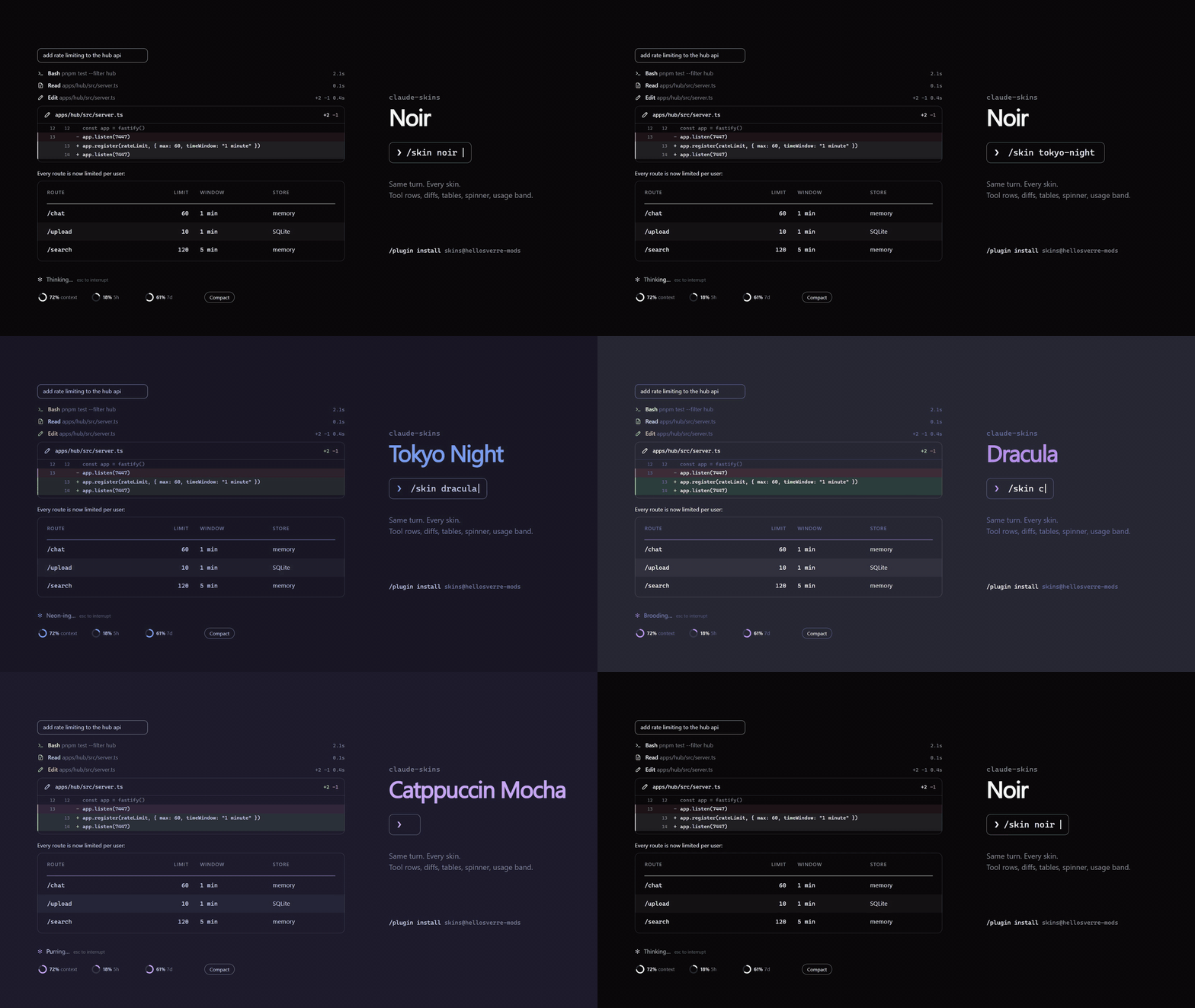
Tool calls with icons and timings, edits as diff cards, tables and code as cards,
a live usage band, and seven skins you can repaint or have Claude design for you.
Install
Needs Claude Code 2.1.287 or later, in a terminal or the desktop app's Code tab. Run both inside Claude Code:
/plugin marketplace add hellosverre/claude-skins
/plugin install skins@hellosverre-mods
Restart Claude Code. The noir skin is on; type /skin to change it.
Update
skins checks for a new release once a day and shows a toast when you are behind. To update:
claude plugin marketplace update hellosverre-mods
claude plugin update skins@hellosverre-mods
Then restart Claude Code. Open sessions keep the version they started with.
Uninstall
claude plugin uninstall skins@hellosverre-mods
To keep it installed but go back to Claude Code's own drawing, run /skin off.
Use
| Command | What it does |
|---|---|
/skin | Settings: pick a skin with a live preview, toggle parts, repaint any colour |
/skin <name> | Switch skin: noir, tokyo-night, dracula, catppuccin, nord, gruvbox, mono |
/skin list | Every skin, yours included |
/skin off | Back to Claude Code's own drawing |
/skin rail|shimmer|band|clip on|off | Toggle one part |
/skin tables on|text|off | text draws tables and code as selectable text on the desktop |
/skin gallery | Every element the skin draws, numbered, to point at |
/skin pin · unpin · share | Give this folder its own look, drop it, or make it the default |
Design one with Claude. Ask "make me a skin that feels like a sunset". skins gives Claude a
design tool, so it builds the skin and applies it while you watch. Repainting a built-in skin saves
it as your own my-<skin>. Choices are remembered across sessions.
Preview
Drawn by the mod's own card code (scripts/previews.ts), not screenshots.


What it redraws
| Part | Desktop app | Terminal |
|---|---|---|
| Tool calls | Icon per kind, spinner while running, lines changed, time taken | A node on the turn's rail |
| Edits | Diff card with +N −M and numbered lines | Claude Code's own diff |
| Shell commands | Terminal card with status, stderr apart, long output folded | Claude Code's own output |
| Tables | Card with header rule, zebra rows, colour swatches | Cell grid with a header band |
| Code blocks | Card with language, line numbers, highlighting; shell blocks keep the Run button | Claude Code's own markdown |
| Spinner | Animated icon per phase | The skin's word with a band of light |
| Above the prompt | Context and plan-limit rings, Compact button, nudge at 70% | Block meters, same button |
| Your prompts | Rounded outline | The same |
Every card has a Copy button and animates once, on first draw, respecting reduced motion. Only the drawing changes: the stored conversation and what the model reads are untouched. Agents, plan mode and the permission prompt keep Claude Code's own drawing.
Light and dark. Every skin has both and follows Claude Code's theme. On auto it follows your
terminal (COLORFGBG) or the system. Force one with SKINS_THEME=light or SKINS_THEME=dark.
Privacy
skins draws and remembers, nothing else. It reads the session directory, your context and plan
usage, the theme setting and SKINS_THEME / COLORFGBG, and keeps its settings in the mod store.
Its one network call is the daily version check: a GET of this repo's
plugin.json on raw.githubusercontent.com, sending nothing. On auto
it asks the OS for light or dark mode (defaults on macOS, gsettings on GNOME). It compacts or
copies only when you press the button. Check it yourself with claude plugin validate ..
Develop
git clone https://github.com/hellosverre/claude-skins && cd claude-skins
claude --plugin-dir .
Saving a file reloads the mod in the running session. Tests: claude plugin test .. Previews:
npx tsx scripts/previews.ts. A new built-in skin is one file: copy hooks/themes/nord.ts, change
the colours and words, add a line to hooks/themes/index.ts.
License
MIT